

Zoom Math Starter Edition App4Math (FREE!)
Download App4Math
TI-83 Plus, TI-84 Plus, TI-84 Plus Silver Edition
Download App4Math
TI-84 Plus Silver Edition C
Do you already have App4Math?
If you have a TI-84 Plus Silver Edition graphing calculator, you may have App4Math on your calculator already! Press your calculator’s APPS key. Does the menu include “App4Math”? Then go down to App4Math and press ENTER. Now you’re ready to Zoom!
If you already have App4Math, you may want to upgrade to Zoom Math 200. Even the free version of Zoom 200 can do some algebra, and if you buy a registration key it can do even more.
App4Math Makes Calculations Easy
Without App4Math, your graphing calculator can be confusing. Fractions, exponents, and square roots don’t look the same as they do in your textbook. Variables are always capitalized.
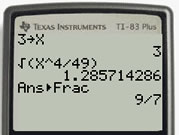
Without App4Math
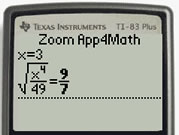
With App4Math
Without App4Math, if you want to make x equal -5, you have to type “-5
x“…and you have to be careful to use the minus key in parentheses, not the regular subtraction key. To type x3, you have to use the MATH menu or the ^ key.
With App4Math, everything looks right! Fractions look like real fractions. Exponents and square roots look right. Variables are lowercase.
With App4Math, if you want to make x equal -5, just type “x=-5“. You can use the regular subtraction key or the minus key in parentheses—it doesn’t matter. To type x3, just press x and then press 3.
With App4Math, you can quickly change your answer to the form you want. Do you want to see a few more decimal places of your answer? Just press the right arrow a few times. Do you want to change the answer to a fraction? Just press ÷. Or press MODE repeatedly to see all the possible forms of the answer, including:
- Decimal
- Improper Fraction
- Mixed Fraction
- Percentage
- Scientific Notation
- Quotient with Remainder
Free Upgrades Make Math Even Easier!
Even if you do not buy a Registration Key, Zoom Math 100 can do everything App4Math does, plus a little bit of graphing. Even if you do not buy a Registration Key, Zoom Math 200 can do everything App4Math does, plus a little bit of graphing and a little bit of algebra.
Get a Free Sticker
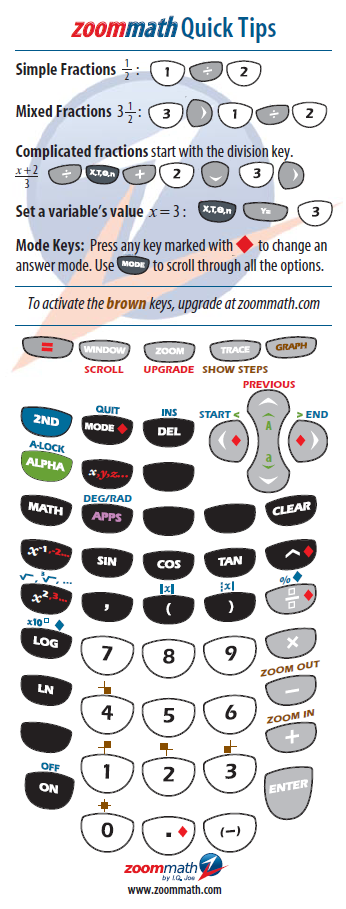
For a limited time, you can get a free Quick Tips sticker that shows how to use App4Math! It fits right inside your calculator lid. Just click here, type your mailing address, and ask for a free Quick Tips sticker.